
My wife wants to sell her 1971 Olds 442 Convertible... I think bringing it to Seagrove would be a good idea... any thoughts on how or where to do this?
Thanks.
P.S. E-mail me if you want to see a couple of pictures. (file was too large to attach)
Replies
9
Beach Fanatic
Asking price? condition?
kt loo
You're killing me ova here. Does it look something like this?
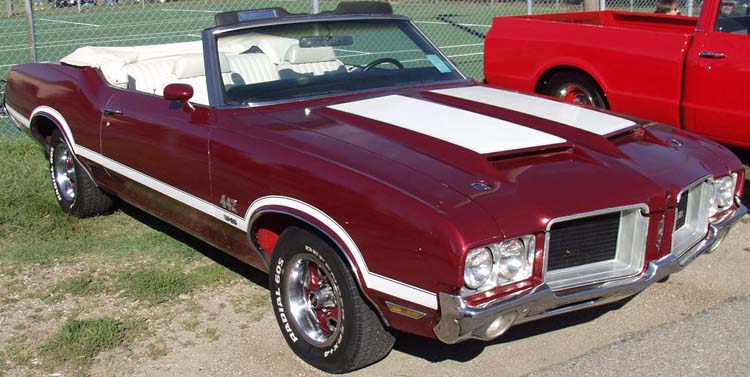
or this?

Sadly, I can't buy it. But a girl can dream...good luck.
or this?
Sadly, I can't buy it. But a girl can dream...good luck.
Beach LoverAuthor
close... black interior...65,000 miles....$29,000.
It's awesome... the reason for selling is that I bought it for her on her 40th birthday two years ago.... we have three kids.... lots of bikes and skateboards around.... it's too valuable to get banged up.
It's awesome... the reason for selling is that I bought it for her on her 40th birthday two years ago.... we have three kids.... lots of bikes and skateboards around.... it's too valuable to get banged up.

got any pics?
Will it do a burnout? :scratch:

SoWal Expert
Will it do a burnout? :scratch:
Wonder if RO can convert it to a deckboat- kinda like a modern Chitty Chitty Bang Bang!

Beach Crab
4 speed or auto?
Beach LoverAuthor
automatic.... 455

SoWal Expert
P.S. E-mail me if you want to see a couple of pictures. (file was too large to attach)
Reduce the image size to 600x450 and you can attach it.

Admin
Hotlinking photos that are on the internet is preferable to adding as an attachment. The only reason to attach a photo is if it is only on your computer. And even then you should hotlink it after posting it to the SoWal gallery or one of the many other free photo hosting sites on the net like:
http://imageshack.us or http://photobucket.com
Hotlinking is easy.
First of all - you should make sure you are in full wysiwyg mode for many reasons. Click on "user cp" on the link menu at top, click "edit options", scroll to the bottom and under "Message Editor Interface" select "Enhanced Interface - Full WYSIWYG Editing, then save changes.
After doing so, when you are posting, you will see many editing options - one is "insert image" button - - click it and a box comes up where you enter the URL of your image, ie - http://websitename.com/imagename.jpg
So then, when you see an image on the web you want to post, you right click on the image, click properties, click and drag to highlight the name of the image, then right click copy (ctrl C), then right click paste (ctrl V) it into the add image box.
Sounds harder than it is - once you do it a couple of times it is easy. Easier than saving and image to your computer and then uploading as an attachment. One advantage is that it is shown full size instead of as a thumbnail attachment. Just make sure the image is not too wide.
What you end up with to show an image is image tags around a URL:
- with no space.
http://imageshack.us or http://photobucket.com
Hotlinking is easy.
First of all - you should make sure you are in full wysiwyg mode for many reasons. Click on "user cp" on the link menu at top, click "edit options", scroll to the bottom and under "Message Editor Interface" select "Enhanced Interface - Full WYSIWYG Editing, then save changes.
After doing so, when you are posting, you will see many editing options - one is "insert image" button -
- click it and a box comes up where you enter the URL of your image, ie - http://websitename.com/imagename.jpgSo then, when you see an image on the web you want to post, you right click on the image, click properties, click and drag to highlight the name of the image, then right click copy (ctrl C), then right click paste (ctrl V) it into the add image box.
Sounds harder than it is - once you do it a couple of times it is easy. Easier than saving and image to your computer and then uploading as an attachment. One advantage is that it is shown full size instead of as a thumbnail attachment. Just make sure the image is not too wide.
What you end up with to show an image is image tags around a URL:
- with no space.
Checking your forum account
Please wait while we verify your forum account.